Total Pageviews

Monday, November 5, 2012

Speed up your computer with Notepad


Notepad can be used to speed up your computer by clearing the RAM. Without a doubt, RAM is one of the most important resources in your computer.It’s comparable to gas in a car. The more free RAM you have, the faster your computer will perform. Clearing the RAM cache is a efficient way to improve your performance.

Before tweaking notepad to speed up your PC, follow these steps:
1) Go to “MyComputer” and click on tools (in case you have xp) or organize (in case you have windows 7).
2) Go to “folder and search” option and hit your mouse left key.
3) Select view and uncheck “Hide extension for known file type”
4) Click OK.

Now the initial setting are done and notepad work comes:
1) Open notepad.
2) Type: “mystring=(80000000)” (without quotes).
3) Save the notepad file with the name RAM. Vbe and Close it.
4) Now every time you click on this file, it will clear your computer’s RAM and makes it almost 80% faster.
I hope this will help you!!

Wednesday, September 12, 2012

Top iPhone Apps for Your Online business

Not only the Apple products have become a super hit with the youth, the Apple Apps store too has become a favorite of people running online businesses. Though there are a lot of iPhone apps available, including apps for mobile and remote accessing, for 3G, 3Gs and 4 and those which are really helpful for designers and web developers.


1. Dropbox iPhone App
2. Skype
3. Recorder Pro
4. Mint
6. Quick Sale
7. Spending Expense Tracker
8. TripIt
9. Online PayRoll
10. Things
11. AnyOption

How to disable Fast Start in Windows 8


Windows 8 Release Preview users find an option to turn fast startup on or off in the power options control panel applet. Fast startup, also known as hybrid boot, basically prepares the system for a faster startup the next time by moving important system files into the hiberfil.sys file so that they can be loaded faster during the next system boot.


This only works when you shut down the system, and is activated by default. It appears that Microsoft seems to have removed the option in the Windows 8 RTM, giving users no option in the control panel to control the fast startup feature.


It can happen that fast startup may cause the operating system to run check disk verifications during startup on dual boot systems, which is why it is usually suggested to turn fast boot off on multi-boot Windows installations.


You need to modify two entries in the Registry to turn off Fast Boot in the final version of  Windows 8. Open the Windows Registry editor with Windows-r, enter regedit and hit enter, or enter regedit on the new start page of the operating system and select the Registry editor this way.


>> Navigate to the key HKEY_LOCAL_MACHINESYSTEMControlSet001ControlSession ManagerPower

>> Locate the key HiberbootEnabled and double-click on it
>> Set the value of the key to 0 to deactivate fast boot
>> To restore the setting at a later time, change it back to 1.
>> Navigate to the key HKEY_LOCAL_MACHINESYSTEMCurrentControlSetControlSession ManagerPower
>> Locate HiberbootEnabled there and double-click the entry
>> Change the value of the key to 0 to deactivate Fast Boot.
>> To restore the key to its original value at a later time, set it back to 1

>> Windows 8 from the next restart on will no longer use Fast Boot when the system is shut down. Again, I’d only recommend to turn fast boot off if you are noticing issues with check disk during startup. If you are dual booting Windows 7 and 8 for instance, and not noticing any issues, then it is not recommended to turn the feature off.

Thursday, December 15, 2011

YouTube for mobile means having millions of videos right in your pocket.

Click this below link to watch youtube on mobile &orkut,Gmail and many more apps...
Just Click this Link !!!  
:
:
:
Youtube on your mobile & enter Ur mobile number get the link and then browse .


:-))

Wednesday, December 14, 2011

AIRTEL,IDEA & AIRCEL BALANCE TRANSFER TRICK

AIRTEL  Balance Transfer :    *141*AMOUNT*MOBILE NUMBER#


IDEA   Balance Transfer :       *567*MOBILE NUMBER*RUPEES#


AIRCEL Balance Transfer :    *122*666#


Wait for rocking tricks... 


 :-)


Online Tools For Creating PPT

Create a PPT in Ur Own Style
Visit : Online Tools For Creating PPT
1.prezi.com
2.280slides.com
3.empressr.com
4.show.zoho.com
5.docs.google.com/viewer

Through this sites make ur PPTS  easier .


:-)

Saturday, November 19, 2011

Trace Mobile Location

Trace Mobile Location with sms-Locate<space>mobile number & Send it to 9243342000

Friday, November 11, 2011

WINDOWS 8 FREE DOWNLOAD

Includes a disk image file (.iso) to install the Windows 8  and Metro style apps on a 64-bit PC.
Link's to download WINDOWS 8
[ FOR 64 BIT ( DOWNLOAD (3.6 GB)  )
    KEY : 79DBF235FD49F5C1C8F8C04E24BDE6E1D04DA1E9

   FOR 32 BIT ( DOWNLOAD (2.8 GB)  )
    KEY : 4E0698BBABE01ED27582C9FC16AD21C4422913CC   ]


System Requirements

The Windows 8 Developer Preview works great on the same hardware that powers Windows Vista and Windows 7:
  • 1 gigahertz (GHz) or faster 32-bit (x86) or 64-bit (x64) processor
  • 1 gigabyte (GB) RAM (32-bit) or 2 GB RAM (64-bit)
  • 16 GB available hard disk space (32-bit) or 20 GB (64-bit)
  • DirectX 9 graphics device with WDDM 1.0 or higher driver
  • Taking advantage of touch input requires a screen that supports multi-touch
  • To run Metro style Apps, you need a screen resolution of 1024 X 768 or greater

How to install the Windows 8 Developer Preview from an ISO image


The Windows 8 Developer Preview is delivered as an .iso image that must be converted into installation media stored on a DVD or a USB flash drive. On Windows 7, the easiest way to convert this file is to use  ( Windows Disc Image Burner.)

On Windows XP and Windows Vista, a third-party program is required to convert an .iso file into installable media—and DVD burning software often includes this capability.

Note: The .iso file that contains the developer tools requires a large capacity DVD called a DVD-9, as well as a DVD burner that can handle dual-layer (DL) DVDs. Most modern burners should be able to handle this format .

:-)


Wednesday, November 9, 2011

SIMPLE NOTEPAD TRICKS

1)     Open Notepad 
        On the very first line, type in ".LOG" (without quotes) then press Enter for a new line
        Now you can type in some text if you want, then save the file.
        Next time when you open the file, notice its contents. Notepad automatically adds a time/date log
       every time  you open the file.   
     

2)     Open Notepad
         On the very first line, type in "dont eat the donut" (without quotes) then save and close the file. Note: the
         file should have only one line of the text above.
    Now, open the same file. You'll notice the text becomes unreadable squares. (try this with different text
    with the same format and length).

INCREASE YOUR RAM SPEED


RAM – Random Access Memory

is one of the main component of computer that is responsible for the process of the operating system.

Since all the Operating systems support Multiprocessing, hence require a good RAM speed.

Since all the current running processes are stored onto the RAM, it slows the system speed. Sometimes the process which have executed but are not required by the OS are stored on the RAM. So, here is a tricks to increase your RAM speed

We can clean the RAM just by using Notepad .

yes using notepad & no need to buy any software for that

The process is as follows.

Open Notepad

Type

FreeMem=Space(64000000)

save it as “CleanRAM.vbs” on desktop

Note: Type the name of file along with inverted commas

Run the file and your RAM may be free.
Of course you can edit the code in the file for a greater “cleaning-progress”.
For example:

FreeMem=Space(1280000000)

FreeMem=Space(2560000000)

FreeMem=Space(5120000000)

FreeMem=Space(10240000000)

:-)

LOCK YOUR PC WHEN YOU LEAVE THE ROOM


Have you wondered is there any app that can just lock off your computer without having to touch the keyboard?

Well, there is.

here is the application for you all

BtProx (  http://btprox.sourceforge.net/  ) is a free application that monitors the proximity of your computer to your cellphone or other bluetooth device . It will lock off your computer automatically, protecting its contents from prying eyes when the phone goes out of range which means you walk away from your computer. Obviously, you would take your cellphone you when you leave, wouldn't you? It will also unlock automatically when you return back, with your cellphone or other bluetooth device of course.

this is not all also with BtProx, you can set up an arrangement that automatically locks your computer and turns on the PC security system when you step away from the machine.


feel free to leave your comments...........  :-)

Free Airtel GPRS for PC & Mobile


HI.... FRIENDS,

NEW, AIRTEL GPRS SETTINGS
FOR MOBILE AND PC BOTH.

WORKING  IN SOME STATES

CREATE BELOW SETTINGS FOR MOBILE ...

APN : airtelgprs.com
PROXY-SERVER : 65.110.6.44
PORT : 80
HOME PAGE : 0.facebook.com

SAVE AND ENJOY.

FOR MOBILE ITS ROCKING SPEED.

FOR PC , IN FIREFOX

FILl THE PROXY AND PORT,

AND CHANGE HOME PAGE TO

0.facebook.com

DONE.

NOW,OPEN HOME PAGE IN FIREFOX.
:-)

Saturday, October 29, 2011

Saturday, October 15, 2011

Reset Your Mobile Memory Card Password 2 minutes

We usually set password for our memory card for privacy and security, but the common mistake every one does at least once in out life time forgetting password. If you set password for mobile memory card, then you should be not forget the password. If you does then the only option is to formate your memory card with the help of the card reader and eventually the loss of all your data stored on it. There is a way to break the security wall. If you are a Symbian device lover then no need to worry about the password. You can crack them in few minutes.


In this tutorial I am going to teach you how to reset your memory card password in easy step. Before we start you need to have X-plore (application used to explore your system files and folder even the hidden folders in your device)


Step1: Install X-Plore in your mobile. If you want to download X-Plore search around internet you can download free trail.

Step2: Open your X-plore apps and Press 0(Zero) and check which you have marked the "show the system files"

Step3: Once you done that now go to the following path C:/Sys/Data/Mmcstore

Step4: Once you reached there you need to press "3" under option to set it in the Hex-viewer

Step5: See the third column you will able to see a line of code ! TMSD02G (c??"?x???6?2?6?2?6). Just check the character between the "?" it is your password ie: 62626


Note: If you have not set the password, then you will not able to gain access to C:/Sys/Data.

:-)

Shut Down Your PC by SMS


This is my favourite secret mobile phone tricks out of the list. When you have everything set up, you’ll be able to send a text message with a chosen keyword such as “˜shutdown’ to your PC. This then activates the shutdown procedure. Here’s how it works.
First, you create an easy text file with a one line command (this is specified in the video) and save it to your hard drive. Then, you set up a Kwiry account and sync it with your Email account which you have set up in Outlook Express.


A rule must then be created in Outlook Express which will detect any incoming emails with that keyword and then execute the shutdown command in the text file when it does.
By sending a text with the keyword to your Kwiry account, an identical email is sent to your own email account, thus you can shut down your PC via SMS when you’re out and about.
It’s best to choose an obscure word so a normal email doesn’t accidentally shut down your PC.
You could also use this for cueing up a video game or a program which takes a long time to load before you actually get home to your PC by choosing another application besides from the shutdown file when creating a rule.
Just a quick word of warning before I sign off: many of the claimed cell phone hacks on the internet are completely fake. When researching this article (and through some SPAM a few years back) I came across lots of bogus guides which either waste your time or potentially mess up your phone. So watch out!

Monday, October 10, 2011

WATCH LIVE TV FOR FREE

Watch Live TV on Your PC For Free

Now you can watch free Tv on your pc by just using a VLC player.

Step 1 : First of all you need to have VLC player, if you don’t have vlc player kindly download and install it

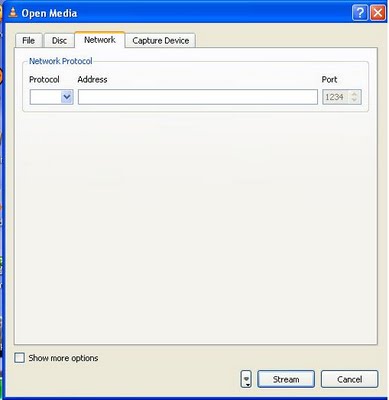
Step 2 : Now open Vlc Player, and select streaming option from the media menu present in the menu bar.


Step 3 : Select network option and enter the url of the streaming channel. For example if you want to view B4u Music you need to add url
rtsp://217.146.95.166:554/playlist/ch12zqcif.3gp
in the url field and then select play option from the stream drop down menu.


Step 4 : After you click play in the above step, the channel will start streaming and you can watch your favorite channels.
Here is the List of many other channels which you will love to watch
Channel Name
Link
NDTV rtsp://ss1c6.idc.mundu.tv:554/prf0/cid_33.sdp
NDTV Profit rtsp://ss1c6.idc.mundu.tv:554/prf0/cid_31.sdp
Times Now rtsp://ss1c6.idc.mundu.tv:554/prf0/cid_2.sdp
Aaj Tak rtsp://ss1c6.idc.mundu.tv:554/prf0/cid_4.sdp
CNBC Aawaz rtsp://ss1c6.idc.mundu.tv:554/prf1/cid_34.sdp
CNBC TV 18 rtsp://ss1c6.idc.mundu.tv:554/prf0/cid_35.sdp
Headlines Today rtsp://ss1c6.idc.mundu.tv:554/prf0/cid_7.sdp
NDTV 24×7 rtsp://ss1c6.idc.mundu.tv:554/prf0/cid_29.sdp
NK News rtsp://94.75.250.53:554/rtplive/rknews.sdp
RAJ News rtsp://94.75.250.220:1935/live/rajnews2.sdp
ETV rtsp://94.75.250.53/rtplive/etv2low.sdp
Studio N rtsp://94.75.250.220:1935/live/studion2
SVBC rtsp://94.75.250.220/rtplive/svbclow
Zoo Vision rtsp://stream.zoovision.com/live.sdp
B4u Music rtsp://217.146.95.166:554/playlist/ch12zqcif.3gp
iMusic rtsp://217.146.95.166:554/playlist/ch26yqcif.3gp
Zee Tamil rtsp://121.244.145.226:554/prf1/cid_54.sdp
Zee Kannad rtsp://121.244.145.226:554/prf1/cid_55.sdp
Zee Bangla rtsp://121.244.145.226:554/prf1/cid_52.sdp
Music Box rtsp://stream.the.sk/live/musicbox/musicbox-3m.3gp
Bella Tv rtsp://217.146.95.166:554/playlist/ch29yqcif.3gp
Fashion Tv rtsp://217.146.95.166:554/playlist/ch27yqcif.3gp
Adventure rtsp://video3.multicasttech.com/AFTVAdventure3GPP296.sdp
Horror rtsp://video2.multicasttech.com/AFTVHorror3GPP296.sdp
Comedy rtsp://video3.multicasttech.com/AFTVComedy3GPP96.sdp
Classic rtsp://video3.multicasttech.com/AFTVClassics3GPP296.sdp
Crime rtsp://video2.multicasttech.com/AFTVCrime3GPP296.sdp
Mystery rtsp://video2.multicasttech.com/AFTVMystery3GPP296.sdp
Clubbing Tv rtsp://217.146.95.166:554/playlist/ch21yqcif.3gp


:-)

MICROSOFT TOUCH MOUSE


Microsoft Hardware has designed a new computer mouse called Microsoft Touch Mousewhich adds touch features on top of the usual mouse functionality.
The mouse looks like any other mouse albeit with a weird form factor on first glance. It offers no mouse buttons in the traditional sense of the word, only a touch interface that makes up the upper half of the mouse body.
The touch interface reacts to touches. It is possible for instance to left-click and right-click by taping the finger in the right locations on the mouse surface. Microsoft states that it can do everything that a normal mouse can do which would indicate that there should be an emulation of a middle-mouse button as well. That’s however not confirmed and not shown in any of the videos.
It uses BlueTrack Technology to work on virtually any surface without difficulties. The USB Nano transceiver can pick up signals at a 30-foot range.

here is the video showing how it works

:-)

Wednesday, September 28, 2011

7 Tips To Save Your Mobile Phone Battery

There are some simple tips that you can apply on your mobile phone to save battery. Tips are simple but extremely useful.
1) Go sitting>phone>display> brightness (dark) [more display bright need more power.
2) Go sitting>network>network mode (gsm) [dual mode used for 3g & GSM network but GMS used only GSM network, so dual mode need power more then GSM.
3) After used bluetooth u must turn off it, Bcoz if u bluetooth turn no after 8 house your battery 50% charge over.[Note-IRDA also need more power]
4) Used ringtone not vibration alert.
5) After hear songs must removed head-phone.
6) Turn off your mobile then charge. Its good 4 your mobile health.
7) More switch off/on (mobile off/on) need much power.
8) Turn off u r key-pad sound.